

|
Driving Controllers: Computer program control, and limitations:
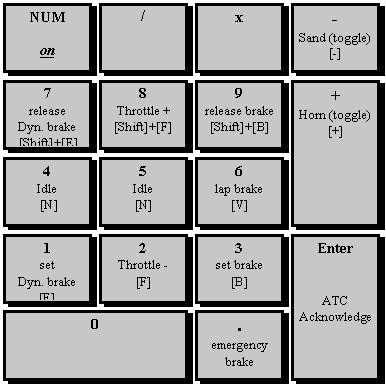 However, it is possible to build, or to have built to order, a realistic driver's control stand that will work with your computer. What you are prepared to pay will determine the complexity! The illustrations shown here: 
are of two styles of European control stand built by Joachim Schmid. Now here is an experimental control station which I have built to prove the control panel concept, independantly of Joachim's project. Earlier keyboards can be adapted to external commands as well as retaining the keyboard functions. Air Brake controls are to the left, throttle controls are to the right, as per the standard Australian practice (for right-hand driving position). The right hand image shows connections taken to the underside of a modified keyboard, with terminations made to existing tinned copper wire links on the "component" side. Click on the image and a larger view opens in a seperate browser window.   It would probably be much more useful to wire them into their own keyboard controller which can then be run as an alternative to the regular computer keyboard. It is, however, just an experimental controller! I am currently working on a partial representation of a modern-style Australian control desk - with what some drivers call 'back-hoe' controls (for example, this is what the AN class of locomotive driver's station in real life looks like),  and I am also working on another type similar to those supplied thirty years ago by GM (through Australian licensee Clyde Engineering) for the various Australian railways that used the classic version of the EMD 'Roller Switch Controller'.  Both variations will use a dedicated (seperate) keyboard controller circuit board which has recently come on to the market at a very reasonable price. If there is interest I could also provide controls that can be connected by the user into their own earlier model keyboard, but this will require technical expertise on the part of the purchaser. Layout for American practice would have the Air Brake controls to the right of the throttle controls on the desktop, and with a roller switch controller to the driver's left, and the air brake control to his right. In the illustration here, taken from the driver's handbook for the Western Australian L-class 3300HP hood unit, model GT-26C, almost identical (except in height) with the SD-45, one can see firstly left hand driver's seat, and secondly the air brake to the left of the driving controls. Here are two photos of the controls of a BL-class locomotive which show equipment supplied in 1984... although those familiar with the classic design EMD roller switch controller will notice that the BL-class controller has different relative positions for the throttle and dynamic braking handles. The layout of the controls in the BL (and Victorian G-class) was changed after discussions between AN, the locomotive enginemens' union, and Clyde Engineering, up to 1983 when the BLs were being erected.   In closing this section on locomotive controls, here is an interesting shot, from the Microsoft Train Simulator programme. Bear in mind this is a Train Simulator, not necessarily a Train Driving Simulator. The digitally created illustration shows a recent American GE powered locomotive with desktop controls similar to the left-hand drive controls on the Australian EMD powered AN class shown above. Note the air brake controls are to the right of the throttle and forward/reverse handle, which is simliar to the layout of controls in the right-hand drive Queensland Railways 4000-class - for which Adelaide company Sydac built a mobile (trailer fitted) driver training simulator during 1999.  We hope to bring a picture of an Australian GE locomotive's driving controls shortly, from the Goninan-built NR class. Enquiries to construct these dedicated control stands to order are not being accepted for either of my control panels, until the economic viability of building them is resolved. However, Joachim Schmidt's controllers are available; please contact him by email - address at the foot of the page.
e-mail info@railsim.de Jens Schubert, RailSim author rs-edwin@erlba.de Martin van der Veer, EdWin developer rs_archiv@yahoo.de Joachim Schmid, Controller developer rashton@ozemail.com.au Richard Ashton, Australian developer
Jens Schubert, RailSim author Martin van der Veer, EdWin developer Joachim Schmid, Controller developer Vern Moorhouse, Verns' Rail Pages - the evaluation site for simulators |
last updated on 20th December 2000
